2.17. Shape section
In this section, how to draw arrows and shapes inside and outside the graph is explained.
2.17.1. A: Arrow section
A: X( \(x\) ) Y( \(y\) ) AX( \(ax\) ) AY( \(ay\) ) C( \(c\) ) A( \(a\) ) N T Z
Arrows are plotted according to the position and size specified after A:. Each parameter is explained below.
2.17.1.1. Parameters for arrow
parameter |
explanation |
|---|---|
|
Set the position of the start point of the arrow be \(x\) in the X coordinate. |
|
Set the position of the start point of the arrow be \(y\) in the Y coordinate. |
|
Set the position of the end point of the arrow be \(ax\) in the X coordinate. |
|
Set the position of the end point of the arrow be \(ay\) in the Y coordinate. |
|
Set the arrow color be \(c\) [1] (D=e) |
|
Set the arrow open angle be \(a\) with a default value of 1. |
|
Do not draw the line of the arrow. The default is draw. |
|
Make the arrow line thicker; repeat for a thicker line. |
|
Make the arrow line thinner; repeat for a thinner line. |
2.17.2. AB: Hollow arrow section
AB: X( \(x\) ) Y( \(y\) ) AX( \(ax\) ) AY( \(ay\) ) C( \(c\) ) CB( \(cb\) ) A( \(a\) ) N T Z
Hollow arrows are drawn according to the position and size specified after AB:. Each parameter is explained below.
2.17.2.1. Parameters for hollow arrow
parameter |
explanation |
|---|---|
|
Set the position of the start point of the arrow be \(x\) in the X coordinate. |
|
Set the position of the start point of the arrow be \(y\) in the Y coordinate. |
|
Set the position of the end point of the arrow be \(ax\) in the X coordinate. |
|
Set the position of the end point of the arrow be \(ay\) in the Y coordinate. |
|
Set the color of the arrow line be \(c\) [2] (D=e) |
|
Set the color of the inner of the arrow be \(cb\) (D=w) |
|
Set the arrow open angle be \(a\) with a default value of 1. |
|
Do not draw the line of the arrow. The default is draw. |
|
Make the arrow line thicker; repeat for a thicker line. |
|
Make the arrow line thinner; repeat for a thinner line. |
2.17.2.2. Example for arrow 1
List 2.32 • Example for arrow 1
 1:  A: X(-2.5) AX(-1.5) Y( 3) AY( 3) N ZZZ
 2:  A: X(-2.5) AX(-1.5) Y( 2) AY( 2) N ZZ
 3:  A: X(-2.5) AX(-1.5) Y( 1) AY( 1) N Z
 4:  A: X(-2.5) AX(-1.5) Y( 0) AY( 0) N
 5:  A: X(-2.5) AX(-1.5) Y(-1) AY(-1) N T
 6:  A: X(-2.5) AX(-1.5) Y(-2) AY(-2) N TT
 7:  A: X(-2.5) AX(-1.5) Y(-3) AY(-3) N TTT
 8:  A: X(-1.5) AX(0) Y( 3) AY( 3) ZZZ
 9:  A: X(-1.5) AX(0) Y( 2) AY( 2) ZZ
10:  A: X(-1.5) AX(0) Y( 1) AY( 1) Z
11:  A: X(-1.5) AX(0) Y( 0) AY( 0)
12:  A: X(-1.5) AX(0) Y(-1) AY(-1) T
13:  A: X(-1.5) AX(0) Y(-2) AY(-2) TT
14:  A: X(-1.5) AX(0) Y(-3) AY(-3) TTT
15:  AB: X(0.5) AX(1.5) Y( 3) AY( 3) N ZZZ
16:  AB: X(0.5) AX(1.5) Y( 2) AY( 2) N ZZ
17:  AB: X(0.5) AX(1.5) Y( 1) AY( 1) N Z
18:  AB: X(0.5) AX(1.5) Y( 0) AY( 0) N
19:  AB: X(0.5) AX(1.5) Y(-1) AY(-1) N T
20:  AB: X(0.5) AX(1.5) Y(-2) AY(-2) N TT
21:  AB: X(0.5) AX(1.5) Y(-3) AY(-3) N TTT
22:  AB: X(1.5) AX(3.5) Y( 3) AY( 3) ZZZ
23:  AB: X(1.5) AX(3.5) Y( 2) AY( 2) ZZ
24:  AB: X(1.5) AX(3.5) Y( 1) AY( 1) Z
25:  AB: X(1.5) AX(3.5) Y( 0) AY( 0)
26:  AB: X(1.5) AX(3.5) Y(-1) AY(-1) T
27:  AB: X(1.5) AX(3.5) Y(-2) AY(-2) TT
28:  AB: X(1.5) AX(3.5) Y(-3) AY(-3) TTT
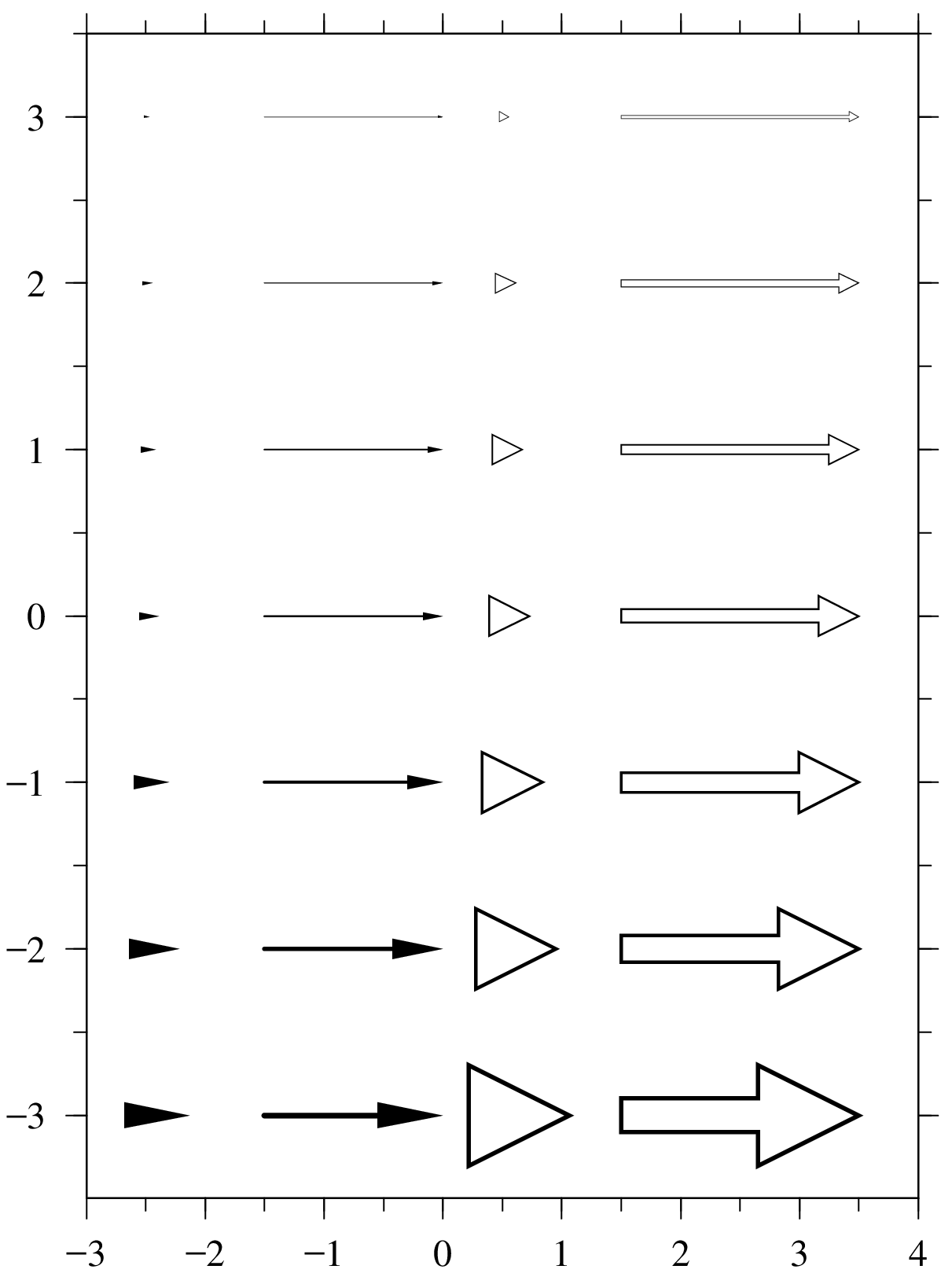
Fig. 2.29 Example for arrow 1
The top 7 lines are arrows without lines, the next 7 lines are ordinary arrows, the next 7 lines are hollow arrows without lines, and the last is a hollow arrow. The thickness can be changed using two parameters of Z and T. The arrows shown in the middle of the Figure 2.29 is in default. The top of arrow can be thin by Z, while the bottom can be thick by T. An arrow without a line part draws a triangular arrow with the start point of the arrow as the center of gravity toward the end point. In that case, there is no corresponding length of the arrow.
2.17.2.3. Example for arrow 2
List 2.33 • Example for arrow 2
 1:  A: X(-2.5) AX(-1.5) Y( 2) AY( 2) N TTT A(0.3)
 2:  A: X(-2.5) AX(-1.5) Y( 1) AY( 1) N TTT A(0.5)
 3:  A: X(-2.5) AX(-1.5) Y( 0) AY( 0) N TTT
 4:  A: X(-2.5) AX(-1.5) Y(-1) AY(-1) N TTT A(1.5)
 5:  A: X(-2.5) AX(-1.5) Y(-2) AY(-2) N TTT A(2.0)
 6:  A: X(-1.5) AX(0) Y( 2) AY( 2) TTT A(0.3)
 7:  A: X(-1.5) AX(0) Y( 1) AY( 1) TTT A(0.5)
 8:  A: X(-1.5) AX(0) Y( 0) AY( 0) TTT
 9:  A: X(-1.5) AX(0) Y(-1) AY(-1) TTT A(1.5)
10:  A: X(-1.5) AX(0) Y(-2) AY(-2) TTT A(2.0)
11:  AB: X(0.5) AX(1.5) Y( 2) AY( 2) TTT N A(0.3)
12:  AB: X(0.5) AX(1.5) Y( 1) AY( 1) TTT N A(0.5)
13:  AB: X(0.5) AX(1.5) Y( 0) AY( 0) TTT N
14:  AB: X(0.5) AX(1.5) Y(-1) AY(-1) TTT N A(1.5)
15:  AB: X(0.5) AX(1.5) Y(-2) AY(-2) TTT N A(2.0)
16:  AB: X(1.5) AX(3.5) Y( 2) AY( 2) TTT A(0.3)
17:  AB: X(1.5) AX(3.5) Y( 1) AY( 1) TTT A(0.5)
18:  AB: X(1.5) AX(3.5) Y( 0) AY( 0) TTT
19:  AB: X(1.5) AX(3.5) Y(-1) AY(-1) TTT A(1.5)
20:  AB: X(1.5) AX(3.5) Y(-2) AY(-2) TTT A(2.0)
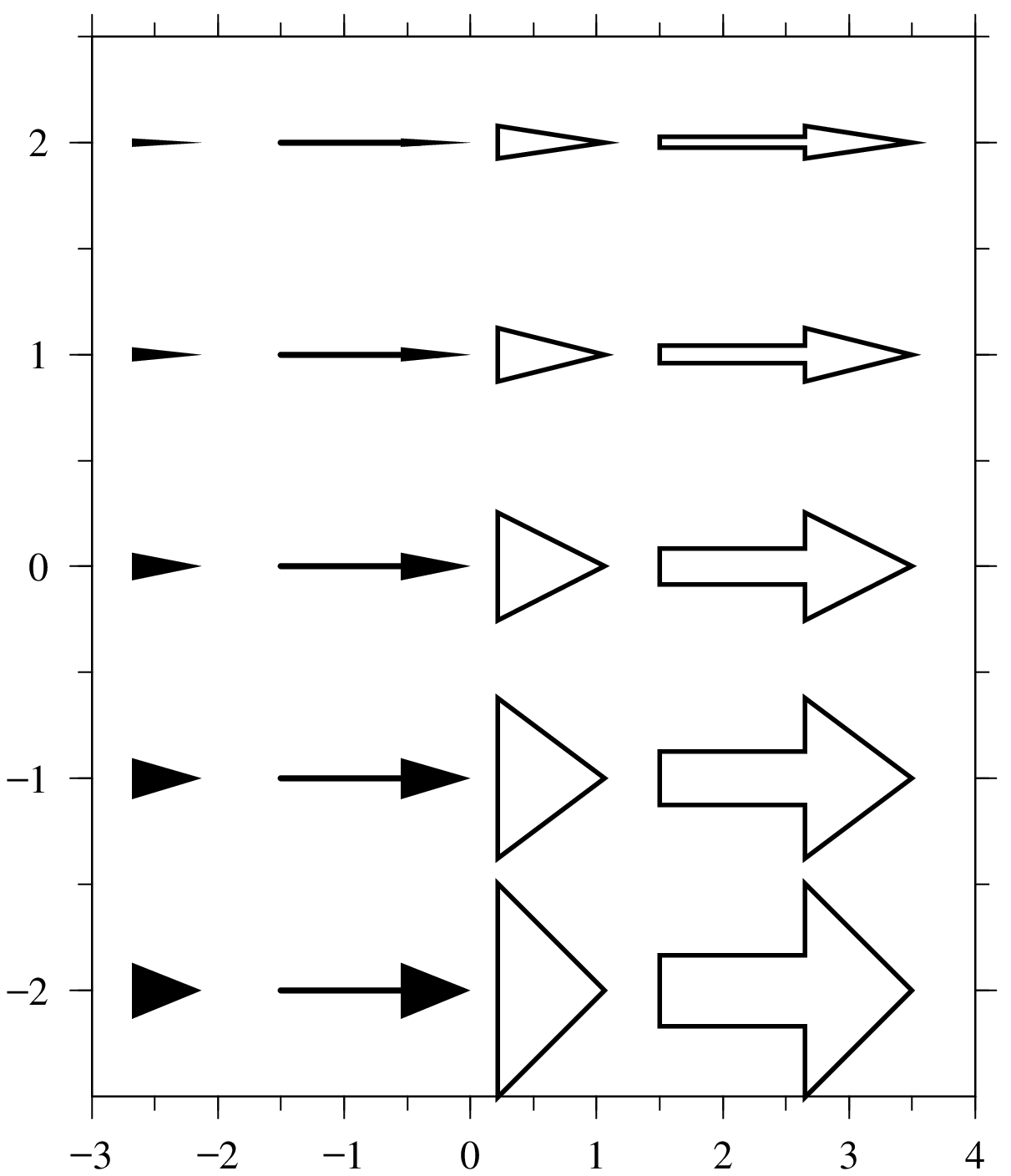
Fig. 2.30 Example for arrow 2
Using A(), you can change the opening angle of the arrow for each arrow type. The arrows shown in the middle of Figure 2.30 is in default.
2.17.3. POLG: Circle and polygon section
POLG: X( \(x\) ) Y( \(y\) ) S( \(s\) ) SX( \(sx\) ) SY( \(sy\) ) CL( \(cl\) ) CB( \(cb\) ) A( \(a\) ) PL( \(pl\) )
A circle or polygon is drawn according to the position and size specified after POLG:. Each parameter is explained below.
2.17.3.1. Parameters for circle and polygon
parameter |
explanation |
|---|---|
|
Set the center position of the circle and polygon be \(x\) in the X coordinate. |
|
Set the center position of the circle and polygon be \(y\) in the Y coordinate. |
|
Multiply the size of circles and polygons by \(s\) with the default value of 1. (D=1) |
|
Multiply the size of circles and polygons by \(sx\) in the x direction with the default value of 1. (D=1) |
|
Multiply the size of circles and polygons by \(sy\) in the y direction with the default value of 1.(D=1) |
|
Set the color of the circle and polygon lines be \(cl\) [3] (D=e) |
|
Set the color of the inner of the circle and polygon be \(cb\) (D=w) |
|
Rotate circles and polygons counterclockwise by \(a\) degrees around (\(x\), \(y\)) (D=0) |
|
Set the polygon be a \(pl\) polygon (D=5) \(pl = 0\) In this case, it becomes a circle. |
2.17.3.2. Example for circle and polygon
List 2.34 • Example for circle and polygon
 1:  POLG: X(-2) Y(2.5)  PL(3)
 2:  POLG: X( 0) Y(2.5)  PL(4)
 3:  POLG: X( 2) Y(2.5)  PL(5)
 4:  POLG: X(-2) Y(1.0)  PL(6)
 5:  POLG: X( 0) Y(1.0)  PL(7)
 6:  POLG: X( 2) Y(1.0)  PL(8)
 7:  POLG: X(-2) Y(-0.5) PL(9)
 8:  POLG: X( 0) Y(-0.5) PL(10)
 9:  POLG: X( 2) Y(-0.5) PL(20)
10:  POLG: X(-2) Y(-2.4) PL(0)
11:  POLG: X( 0) Y(-2.4) PL(0) SX(1.5)
12:  POLG: X( 2) Y(-2.4) PL(0) SY(1.5)
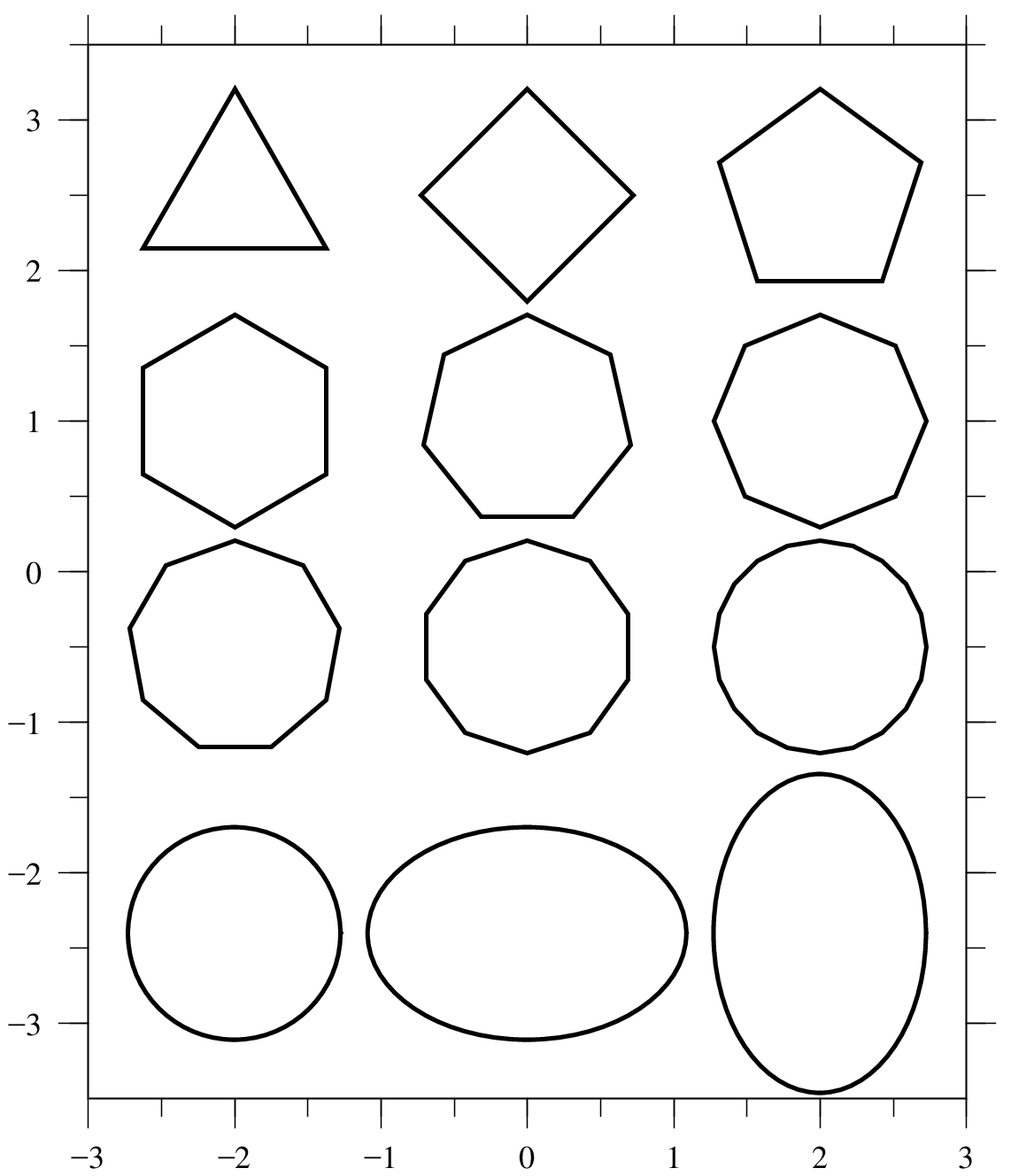
Fig. 2.31 Example for circle and polygon
2.17.4. BOX: Box section
BOX: X( \(x\) ) Y( \(y\) ) S( \(s\) ) SX( \(sx\) ) SY( \(sy\) ) CL( \(cl\) ) CB( \(cb\) ) CS( \(cs\) ) A( \(a\) )BOX( \(boxname\) )Draw boxes according to the position and size specified after BOX:. Each parameter is explained below.
2.17.4.1. Parameters for box
parameter |
explanation |
|---|---|
|
Set the center of the box be \(x\) in the X coordinate. |
|
Set the center of the box be \(y\) in the Y coordinate. |
|
Multiply the size of the box by \(s\) with the default value of 1. (D=1) |
|
Multiply the size of the box by \(sx\) in the x direction with the default value of 1. (D=1) |
|
Multiply the size of the box by \(sy\) in the y direction with the default value of 1. (D=1) |
|
Set the line color of the box be \(cl\) [4] (D=e) |
|
Set the color of the inner of the box be \(cb\) (D=w) |
|
Let the shadow color of the box be \(cs\) (D=e) |
|
Rotate the box counterclockwise by \(a\) degrees around (\(x\), \(y\)) (D=0) |
|
|
\(boxname\) |
explanation |
|---|---|
|
Square box with one line |
|
Box with rounded corners with one line |
|
Square box with double lines |
|
Square box with one line and shadow |
|
Box with rounded corners with one line and shadow |
In these \(boxname\), capitalizing the first letter makes the box line thicker. Also, capitalizing b in box increases the margin around it. If there is no string inside, the box just gets a little bigger. If there is a string, the gap between the string and the box becomes large. There are variations for each of the above 5 types of boxes, making a total of 20 types of boxes.
2.17.4.2. Example for box
List 2.35 • Example for box
 1:  BOX: X(-2.) Y(2.5)  BOX(singlebox)
 2:  BOX: X(0.3) Y(2.5)  BOX(Singlebox)
 3:  BOX: X(3.0) Y(2.5)  BOX(singleBox)
 4:  BOX: X(6.2) Y(2.5)  BOX(SingleBox)
 5:  BOX: X(-2.) Y(0.5)  BOX(ovalbox)
 6:  BOX: X(0.3) Y(0.5)  BOX(Ovalbox)
 7:  BOX: X(3.0) Y(0.5)  BOX(ovalBox)
 8:  BOX: X(6.2) Y(0.5)  BOX(OvalBox)
 9:  BOX: X(-2.) Y(-1.5) BOX(doublebox)
10:  BOX: X(0.3) Y(-1.5) BOX(Doublebox)
11:  BOX: X(3.0) Y(-1.5) BOX(doubleBox)
12:  BOX: X(6.2) Y(-1.5) BOX(DoubleBox)
13:  BOX: X(-2.) Y(-3.5) BOX(shadowbox)
14:  BOX: X(0.3) Y(-3.5) BOX(Shadowbox)
15:  BOX: X(3.0) Y(-3.5) BOX(shadowBox)
16:  BOX: X(6.2) Y(-3.5) BOX(ShadowBox)
17:  BOX: X(-2.) Y(-5.5) BOX(ovalshadowbox)
18:  BOX: X(0.3) Y(-5.5) BOX(Ovalshadowbox)
19:  BOX: X(3.0) Y(-5.5) BOX(ovalshadowBox)
20:  BOX: X(6.2) Y(-5.5) BOX(OvalshadowBox)
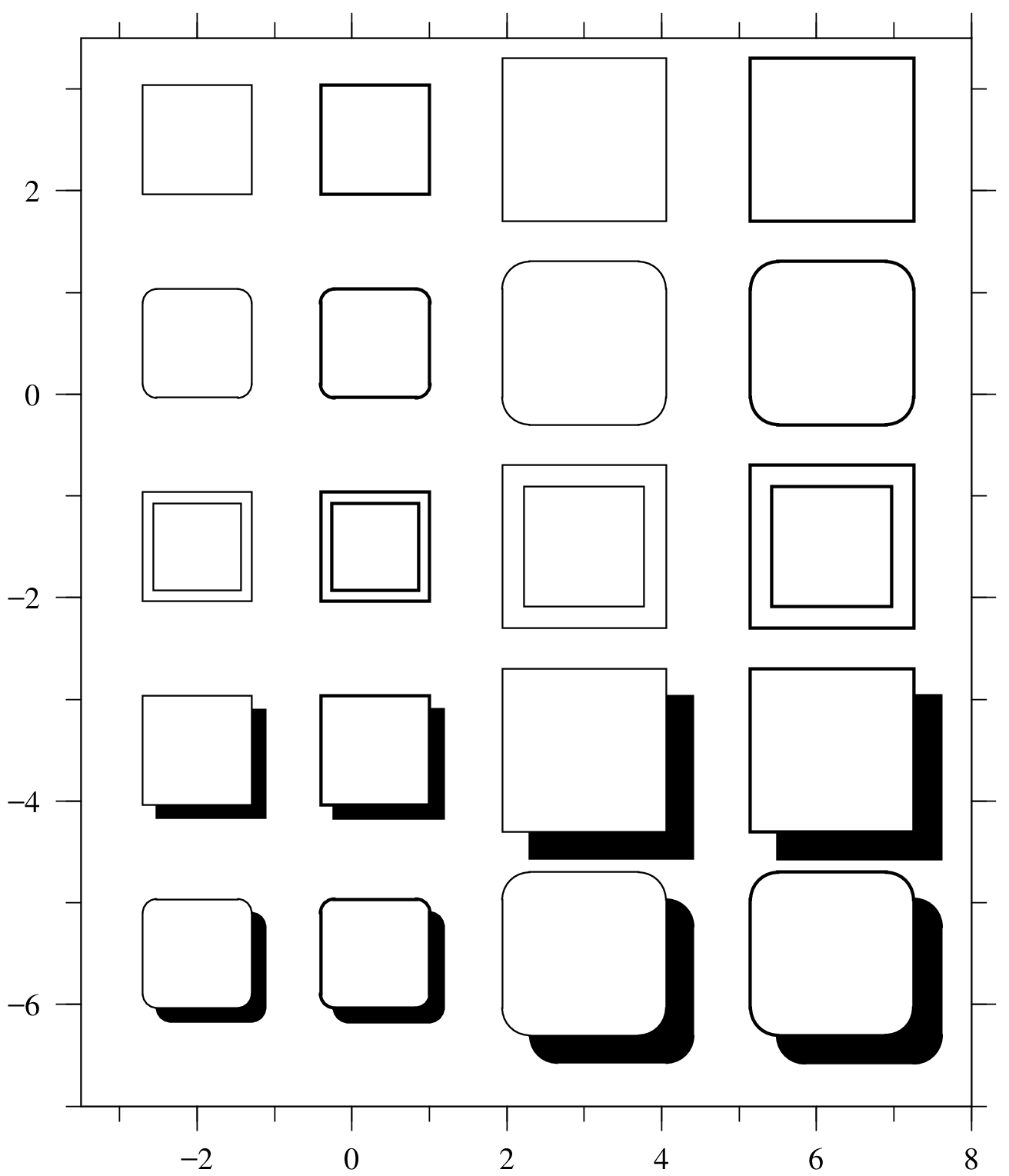
Fig. 2.32 Example for box
2.17.5. RIBN: Ribbon section
RIBN: X( \(x\) ) Y( \(y\) ) S( \(s\) ) SX( \(sx\) ) SY( \(sy\) ) CL( \(cl\) ) CB( \(cb\) ) CS( \(cs\) ) A( \(a\) ) T Z
The ribbon is drawn according to the position and size specified after RIBN:. Each parameter is explained below.
2.17.5.1. Parameters for ribbon
parameter |
explanation |
|---|---|
|
Set the center of the ribbon be \(x\) in the X coordinate. |
|
Let the center of the ribbon be \(y\) in the Y coordinate. |
|
Multiply the size of the ribbon by \(s\) with the default value of 1 (D=1) |
|
Multiply the size of the ribbon by \(sx\) in the x direction with the default value of 1. (D=1) |
|
Multiply the size of the ribbon by \(sy\) in the y direction with the default value of 1. (D=1) |
|
Set the ribbon line color be \(cl\) [5] (D=e) |
|
Set the color of the inner of the ribbon be \(cb\) (D=w) |
|
Set the shadow color of the ribbon be \(cs\) (D=j) |
|
Rotate the ribbon counterclockwise by \(a\) degrees around (\(x\), \(y\)) (D=0) |
|
Make the ribbon line thicker; repeat for a thicker line. |
|
Make the ribbon line thinner; repeat for a thinner line. |
2.17.5.2. Example for ribbon
List 2.36 • Example for ribbon
1:  RIBN: X(0) Y(2.0)  SX(1.5) SY(2.0)
2:  RIBN: X(0) Y(0)
3:  RIBN: X(0) Y(-1.5) S(1.5) CB(y) CS(rrr)
4:  RIBN: X(-5) Y(-4.5) A(-45)
5:  RIBN: X( 5) Y(-4.5) A( 45)
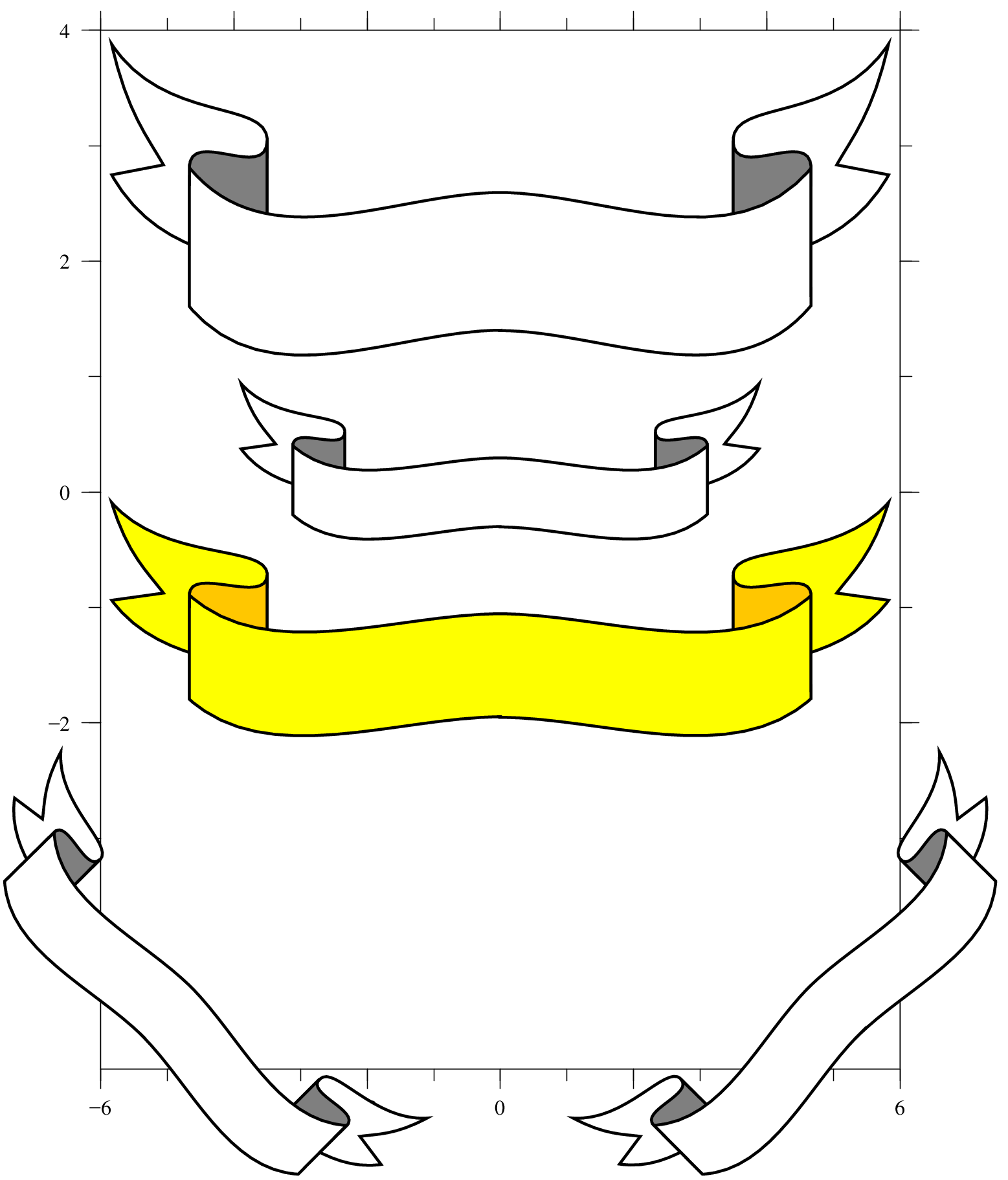
Fig. 2.33 Example for ribbon
2.17.6. STAR: Star section
STAR: X( \(x\) ) Y( \(y\) ) S( \(s\) ) SX( \(sx\) ) SY( \(sy\) ) CL( \(cl\) ) CB( \(cb\) ) A( \(a\) ) T Z PL( \(pl\) ) V( \(v\) )
A star shape is drawn according to the position and size specified after STAR:. Each parameter is explained below.
2.17.6.1. Parameters for star
parameter |
explanation |
|---|---|
|
Set the center of the star be \(x\) in the X coordinate. |
|
Set the center of the star be \(y\) in the Y coordinate. |
|
Multiply the size of the star by \(s\) with the default value of 1. (D=1) |
|
Multiply the size of the star by \(sx\) in the x direction with the default value of 1. (D=1) |
|
Multiply the size of the star by \(sy\) in the y direction with the default value of 1.(D=1) |
|
Set the color of the star line be \(cl\) [6] (D=e) |
|
Set the color of the inner of the star be \(cb\) (D=w) |
|
Rotate the star counterclockwise by \(a\) degrees around (\(x\), \(y\)) (D=0) |
|
Make the star line thicker; repeat for a thicker line. |
|
Make the star line thinner; repeat for a thinner line. |
|
Set the star polygon be a \(pl\) polygon (D=5) |
|
Set the unevenness of the polygon of the star be \(v\) with the default value 1. (D=1) |
2.17.6.2. Example for star
List 2.37 • Example for star
 1:  STAR: X(-2) Y(2.5) PL(3)
 2:  STAR: X( 0) Y(2.5) PL(4)
 3:  STAR: X( 2) Y(2.5) PL(5)
 4:  STAR: X(-2) Y(1.0) PL(6)
 5:  STAR: X( 0) Y(1.0) PL(7)
 6:  STAR: X( 2) Y(1.0) PL(8)
 7:  STAR: X(-2) Y(-0.5) PL(9)
 8:  STAR: X( 0) Y(-0.5) PL(10)
 9:  STAR: X( 2) Y(-0.5) PL(20)
10:  STAR: X(-2) Y(-2.0) PL(5) V(0.5)
11:  STAR: X( 0) Y(-2.0) PL(5) V(1.3)
12:  STAR: X( 2) Y(-2.0) PL(5) V(1.6)
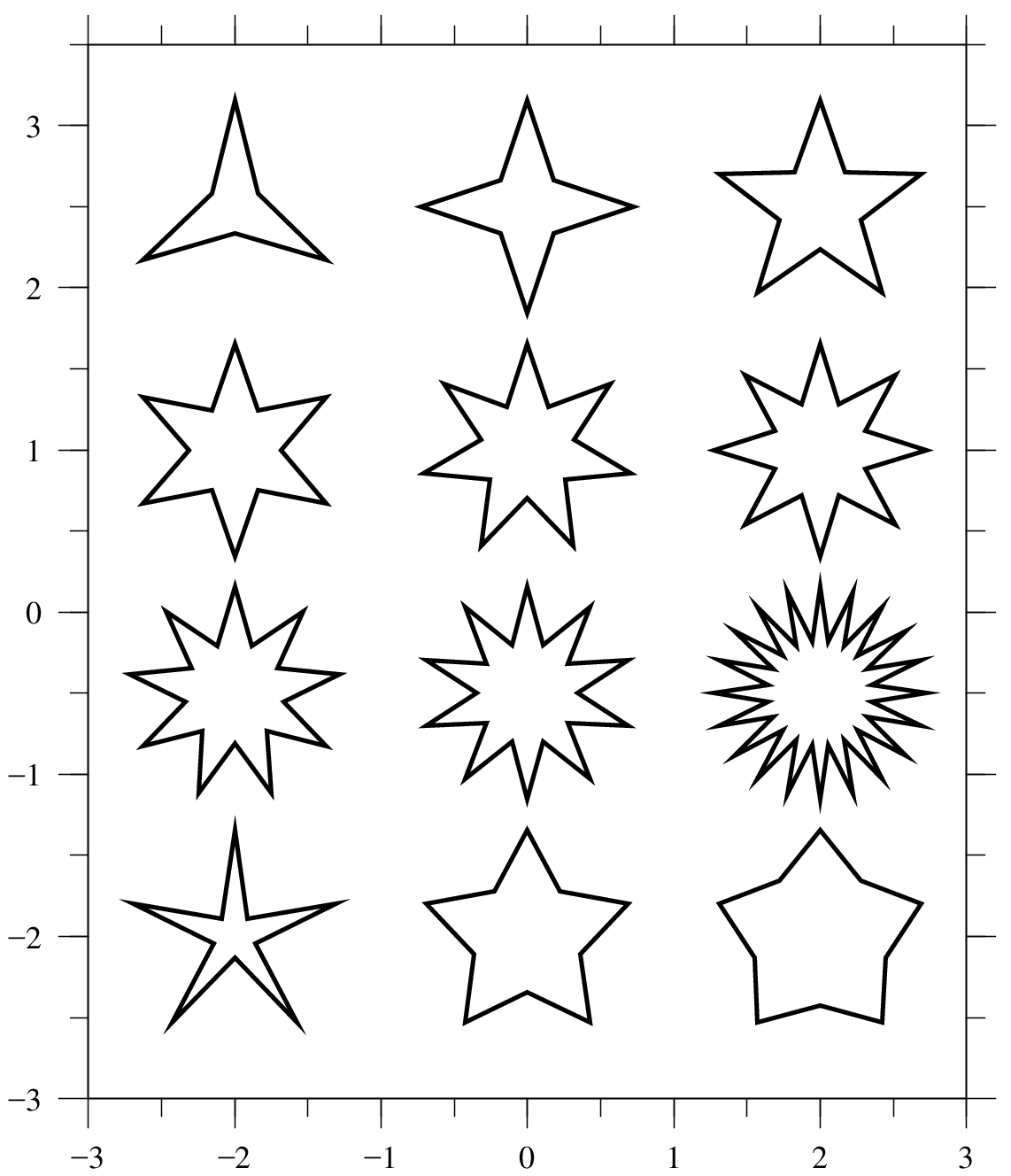
Fig. 2.34 Example for star