2.20. Mathematic equation
2.20.1. Math mode
ANGEL also enables expression a variety of mathematical equation in the same manner as TeX and LaTeX. In ANGEL , there is no math mode like LaTeX. Most of the commands described below can only be used in math mode in LaTeX. But, in ANGEL they can be used in normal mode as they are. Noted that, even with ANGEL , there is a math mode that is sandwiched between $ $. In the part between $ $, the alphabetic characters are italicized, and symbols such as =,-, + are automatically changed to the symbol typeface, making the appearance as a math formula better.
2.20.2. Space control
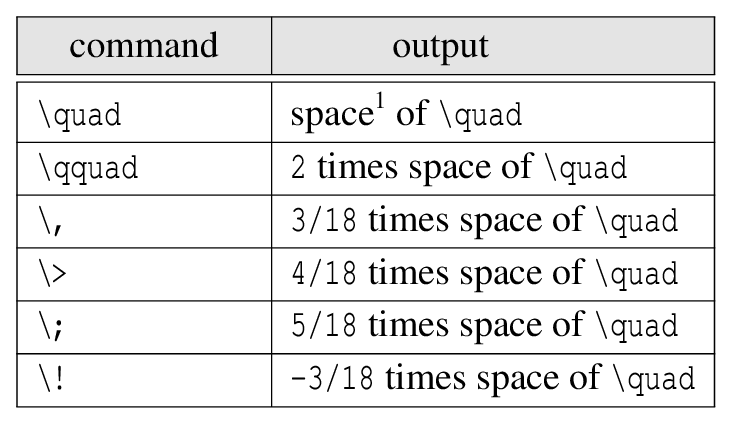
In the math mode of ANGEL , as in the normal mode, half-width spaces are treated as actual half-width spaces except for the half-width spaces after the special command that starts with \. However, there are space control commands similar to LaTeX for fine space control.
|
\quad is to put a 10-point space if you use 10-point characters in the text.2.20.3. Suffix
The subscript is written after the _ symbol, and the superscript is written after the ^ symbol. If the subscript is not a single character, enclose it in { }. You can also use superscripts and subscripts at the same time. Also, it can be attached in multiple layers.
2.20.4. Fraction
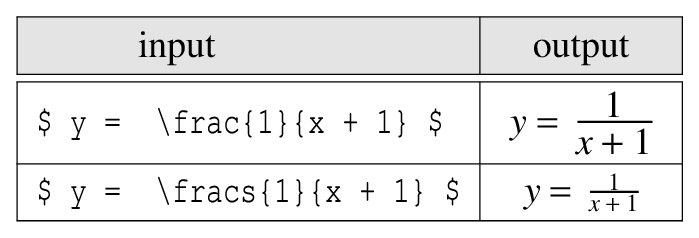
The format of the fraction is the same as LaTeX, using \frac{ }{ }. Specify the numerator in the first argument and the denominator in the second argument. This command corresponds to a separate fraction expression of LaTeX.
In LaTeX text, this fraction is output in small letters. Since ANGEL does not make this distinction, the fractional expression output in small characters is \fracs{ }{ }. The input and output of the example are shown below.
|
2.20.5. Square root
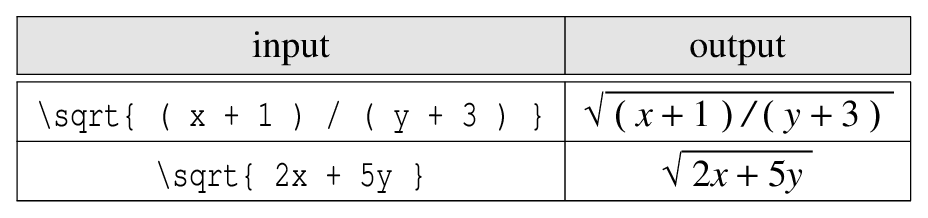
Use the command \sqrt to represent the square root. For example, to output \(\sqrt{x}\), write \sqrt{x}. Even if you put a long formula in the x part, it will be automatically expanded. However, in the case of ANGEL , unlike LaTeX, the square root symbol does not extend up or down. Therefore, large fractions and subscripts will be out of the square root symbol.
|
2.20.6. Greek alphabet
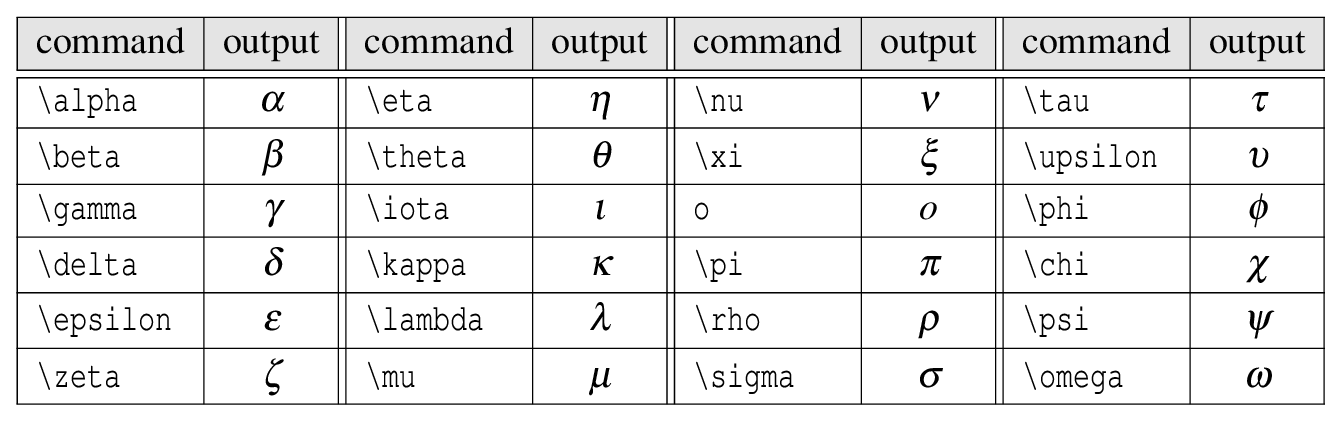
Greek letters are often used in mathematical formulas. The following Greek letters can be used anywhere in ANGEL .
|
A variant typeface exists in some Greek lowercase letters.

|
The command to output the uppercase Greek letter is the capitalized English name following \.

|
2.20.7. Math accent
ANGEL does not have the same math mode as LaTeX, so you can use regular accent command as well. You can also use the following LaTeX math accents.
Here is an example of accenting \(a\).
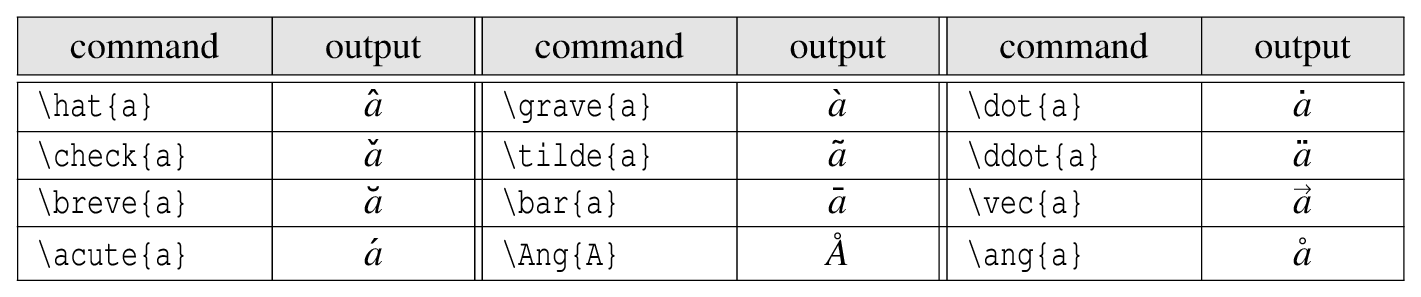
|
There are also large math accents such as:

|
2.20.8. Math ruby
\mathop{ 1st argument }^{ 2nd argument }\mathop{ 1st argument }_{ 2nd argument }If using ^, the second argument is placed in the upper center of the first argument. Meanwhile when using _, the second argument is placed in the lower center of the first argument. An example is shown below.
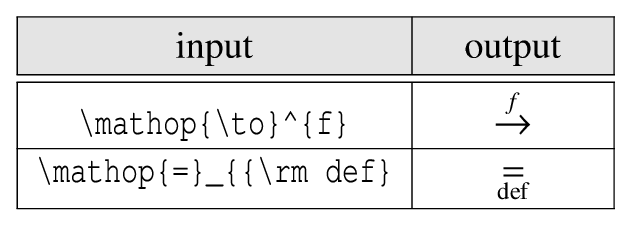
|
2.20.9. Binary operator
It is a companion to the operators for addition and subtraction.
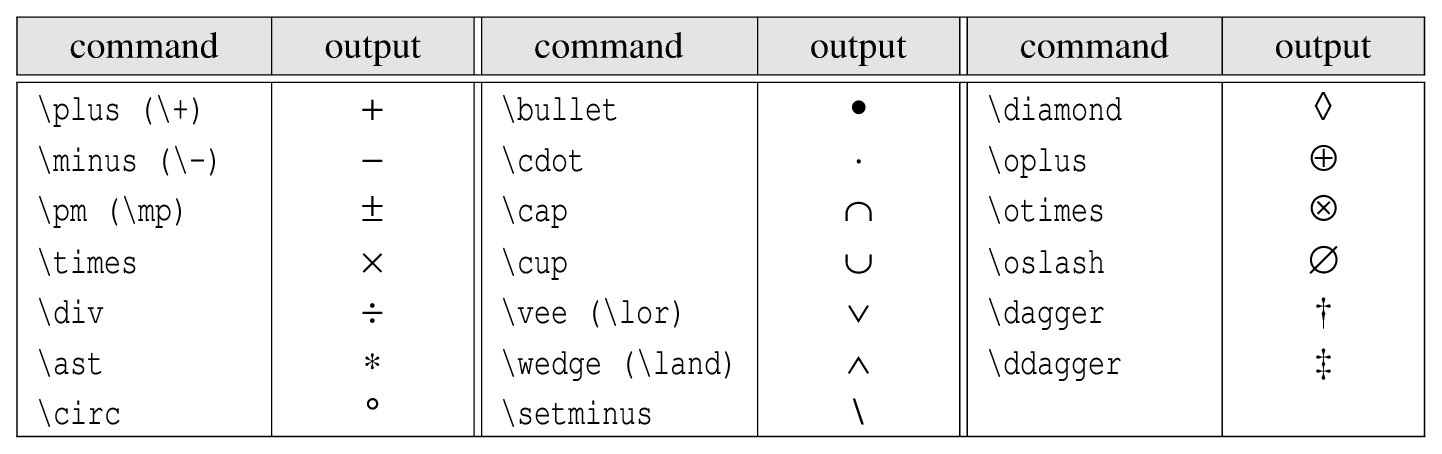
|
2.20.10. Relational operator
It is a companion to the equal sign \(=\) and the inequality sign \(<, >\).
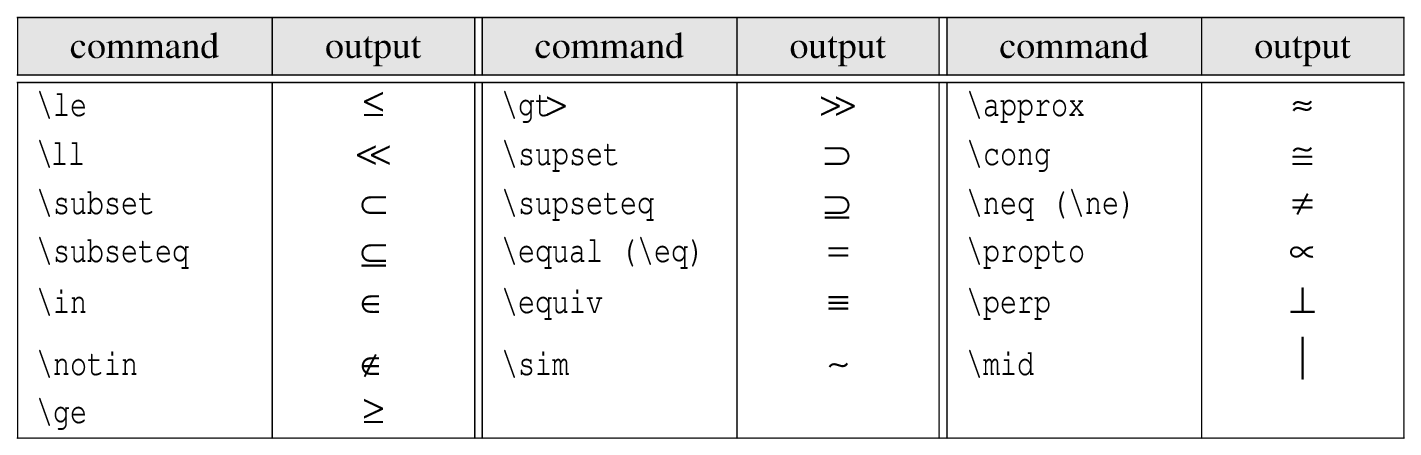
|
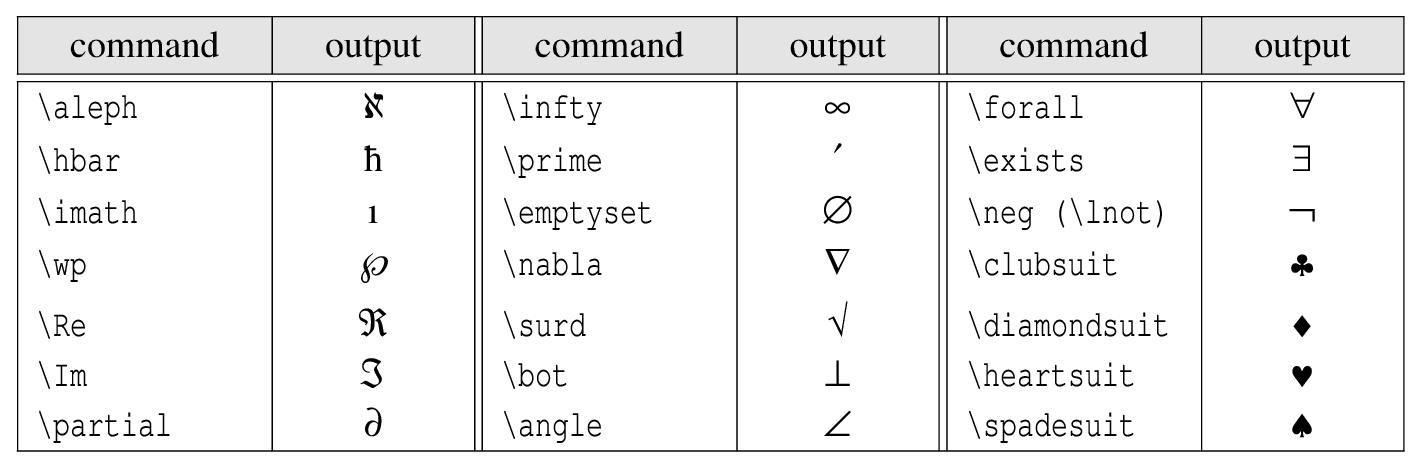
2.20.11. Mathematical symbols
They are mathematical symbols such as Planck’s constant \(\hbar\), infinity \(\infty\), and empty set \(\emptyset\).
|
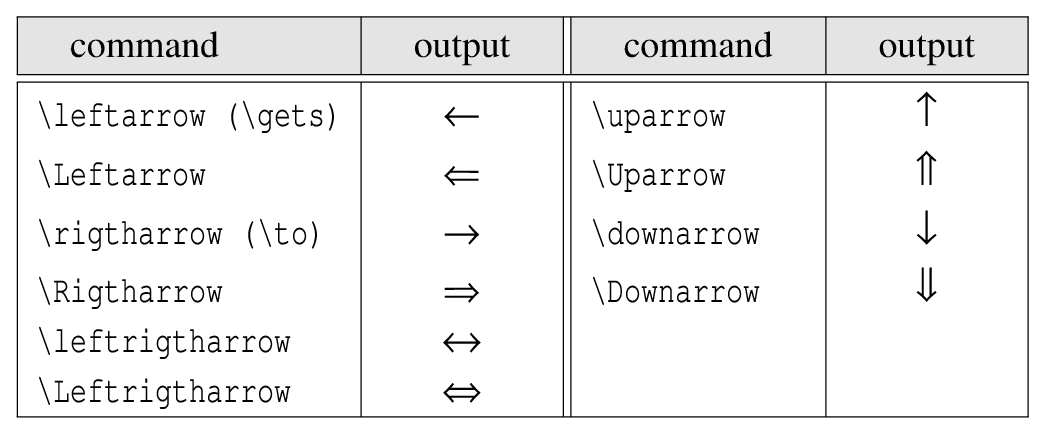
2.20.12. Arrows
|
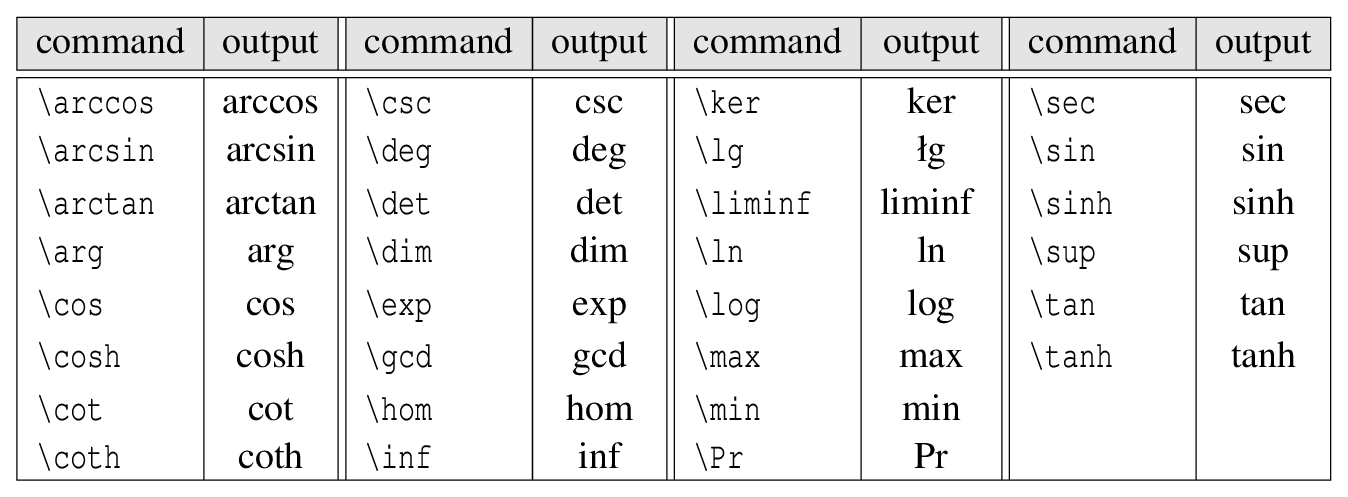
2.20.13. Mathematical function
If you write $log x$ with the intention of outputting \(\log x\), you can get an unsightly output like \(log x\). Correctly write $\log x$ using the command \log. Mathematical functions in the following are available.
|
2.20.14. Large math symbol
For large mathematical symbols such as the sum symbols, there may be subscripts above and below the symbol. The following are the ones in which the subscripts fit neatly up and down. Each command with s at the end corresponds to when used inside the text line of LaTeX.

|
2.20.15. Integral symbol
Integral symbols come in three sizes.

|
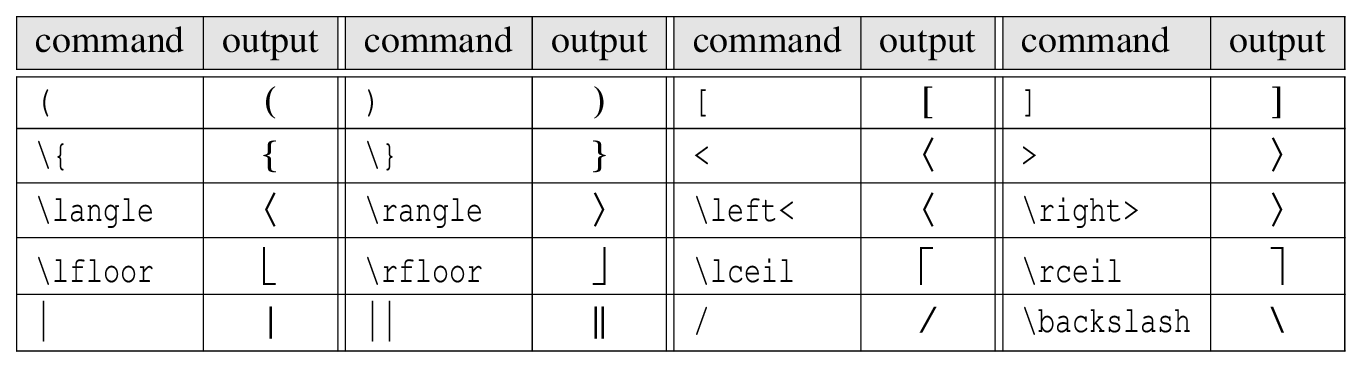
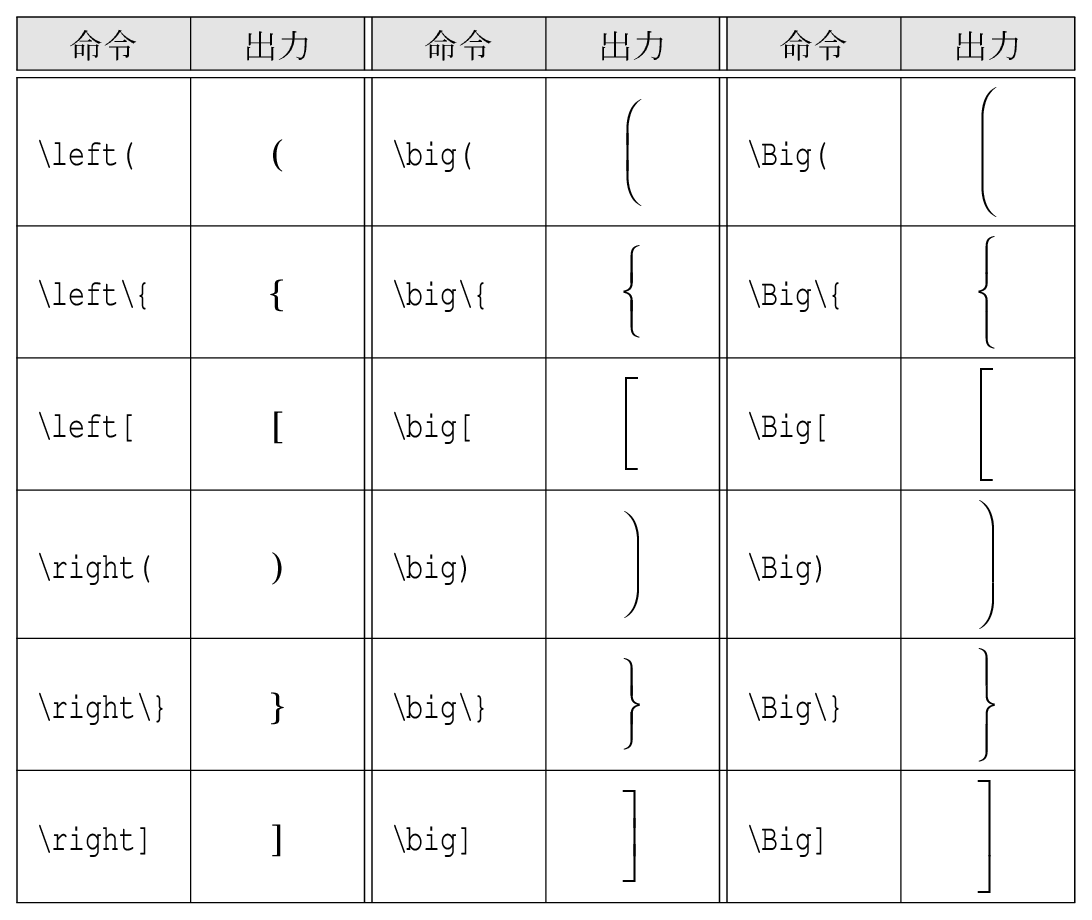
2.20.16. Parentheses and delimiters
|
The following parentheses come in three sizes.
|