3.4. Put the height of the contour lines in the figure
You need to display the height of the contour lines shown in the contour map. At the current state, ANGEL does not have the ability to display this automatically. Also, unfortunately there is no easy way to write this. After all, there is no other way but to add comments by hand. However, if you enclose the numbers to be written in a white box as shown in the example below and write them in the figure, it will look beautiful.
List 3.10 • Height of contour lines
 1:  p: ipd2 icut(5) cuts(3.5,9.5,15.5,21.5,27.5)
 2:  w:{\singlebox{e}{w}{w} 3.5}/  x(-2.4) y( 2.3) ix(2) iy(2) a( 30)
 3:  w:{\singlebox{e}{w}{w} 3.5}/  x( 0.0) y( 1.5) ix(2) iy(2) a( 30)
 4:  w:{\singlebox{e}{w}{w} 9.5}/  x(-0.5) y( 0.0) ix(2) iy(2) a( 50)
 5:  w:{\singlebox{e}{w}{w} 15.5}/ x( 1.0) y( 0.0) ix(2) iy(2) a(-15)
 6:  w:{\singlebox{e}{w}{w} 21.5}/ x( 0.3) y(-0.6) ix(2) iy(2) a( 30)
 7:  w:{\singlebox{e}{w}{w} 27.5}/ x( 1.1) y(-1.0) ix(2) iy(2) a(  0)
 8:
 9:  H2: Y = 3.0 TO -3.0 BY -1.0 ; X = -3.0 TO 3.0 BY 1.0 ;
10:   0    0    0    0    0    0    0
11:   0    8    0    2    4    0    0
12:   0    0    1    5    6    2    0
13:   0    2    4   14   15    9    0
14:   0    2    5   23   32   12    0
15:   0    0    3   10   16    8    0
16:   0    0    0    0    0    0    0
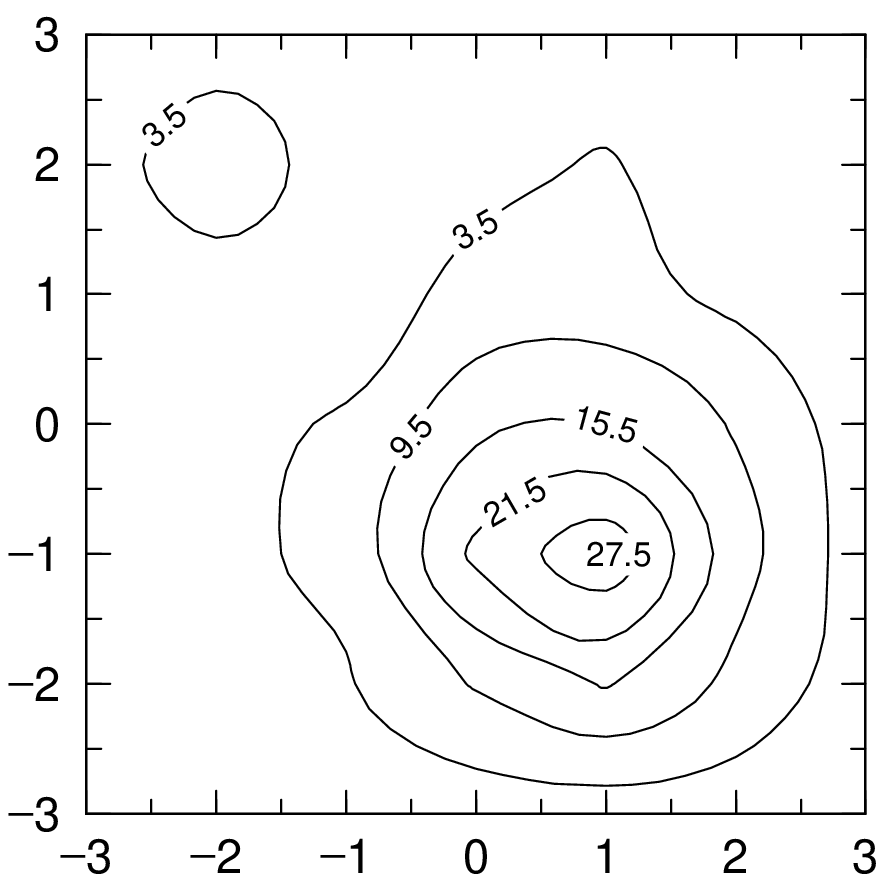
Fig. 3.15 Height of contour lines
The first line defines the number of contour lines and their height. Write the comments from the 2nd to 7th lines while looking at the figure. At that time, using a white box and using ix(2) iy(2). This is a point. I’m using the rotation of the letters in the comment to match the numbers to the lines.